Guide
Why are my Tooltips not Displaying Properly?
SPCAF uses settings within Windows you can change where menus appear on the screen by indicating which hand you write with. This, unfortunately, causes the issue in SPCAF to now display the tooltips correctly.
In order to fix this issue you will need to change the alignment of how menus align in Windows. In order to change the settings you will need to:
-
Press the Windows + R keys to open Run.
-
Copy and paste the location below into Run, and click/tap on OK to open Tablet PC Settings.
- %windir%\explorer.exe shell:::{80F3F1D5-FECA-45F3-BC32-752C152E456E}
-
Click on the Other tab in Tablet PC Settings.
-
Make sure that the radial is in Left-handed so that the menus open to right.
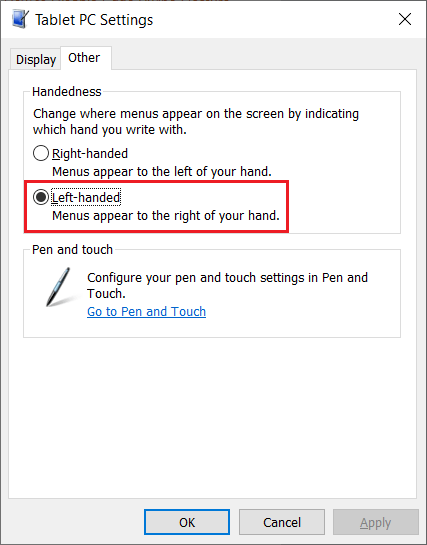
-
Click OK.
-
Close down SPCAF and reopen and check if the tooltips are correctly showing.