Guide
How To Install Spcaf In SPDocKit
This functionality is meant for use with SharePoint Framework projects.
Please refer to SPDocKit documentation to find out what version of SPCAF is available with the product.
Running SPCAF analysis of your SharePoint Framework project from SPDocKit allows you to stay productive and easily check if there are any issues in your project. If any issues are found you can quickly fix them. There are two ways to install the SPCAF extension in SPDocKit (Online and Offline).
Online Installation
If the machine running SPDocKit, has an internet connection the easiest method to install SPCAF is straight from the program.
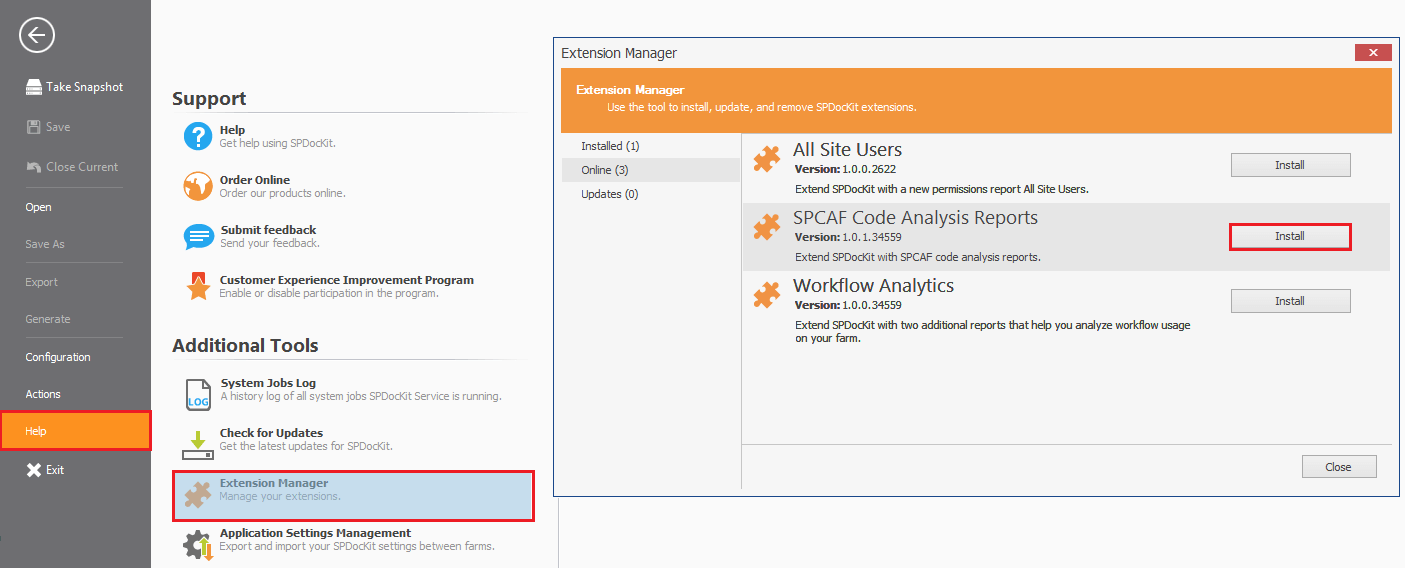
- Load SPDocKit.
- Click On “Help”.
- Click on “Extension Manager” under “Additional Tools”.
- On the “Extension Manager” click [Install] against SPCAF.
Once the installation has completed you will be prompted to restart SPDocKit and the SPDocKit service for the integration to be complete.
Offline Installation
If the machine running SPDocKit is without the internet you will need to do the following:
- Go to https://www.spdockit.com/resources/extensions/.
- Click on [Download].
- Once the extension has downloaded paste them into the “Extensions” folder, which by default is “C:\ProgramData\SPDoKit\Extensions”.
- As with the Online version, restart SPDocKit and the SPDocKit Service to complete the integration.