Guide
Suppress Violations in Rule Reports
Sometimes the analysis reports potential issues that should not appear in the reports.
Currently, only the suppression of warnings in assemblies and in XML SharePoint code (e.g. Features) are supported. Suppression of warnings in CSS, JavaScript or HTML code is currently not possible.
- Suppress warning in Assemblies (.NET code).
- Suppress warning in XML code.
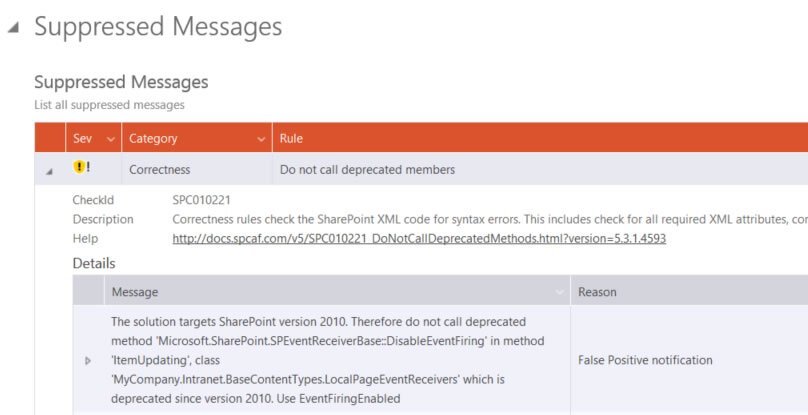
- Suppressed warnings shown in reports.
Suppress warnings in Assemblies (.NET code)
To suppress SPCAF warnings in assemblies, SPCAF supports the attribute “System.Diagnostics.CodeAnalysis.SuppressMessage” of .NET.
The attribute takes 2 arguments for the category of the suppressed rule and for the “Checkid”.
The “Checkid” (second parameter) can have a short form (only Id) and a long form (Id and name of the rule).
Optional argument which are interpreted by SPCAF is Justification. All other arguments (MessageId, Scope, Target) are currently not evaluated by SPCAF.
<em><strong>[SuppressMessage("SPCAF.Rules.BestPractice", "SPC050235:ApplyLockForCachingObjects", Justification = "ApplyLock not needed in this case.")]</strong></em>Suppress warnings for a method
The following code snippet shows how the suppress warnings for the rule “SPC050235 ApplyLockForCachingObjects” for a method. It also shows how to provide a justification for the suppression.
In this case, all warnings for the given rule in this method are suppressed which could lead to unexpected results if only a single warning should be suppressed.
<strong><em>#define CODE_ANALYSIS <br></br>using System.Diagnostics.CodeAnalysis; <br></br>... <br></br>namespace SuppressExample <br></br>{ <br></br> public class ApplyLock <br></br> { <br></br> [SuppressMessage("SPCAF.Rules.BestPractice", "SPC050235:ApplyLockForCachingObjects", Justification = "ApplyLock removed.")] <br></br> public void MethodWithoutApplyLock() <br></br> { <br></br> ... <br></br> } <br></br> } <br></br>}</em></strong>Suppress warnings for a whole class
The following code snippet shows how to suppress all warnings for rule “SPC050235 ApplyLockForCachingObjects” for a whole class.
<em><strong>#define CODE_ANALYSIS <br></br>using System.Diagnostics.CodeAnalysis; <br></br>... <br></br>namespace SuppressExample <br></br>{ <br></br> [SuppressMessage("SPCAF.Rules.BestPractice", "SPC050235:ApplyLockForCachingObjects")] <br></br> public class ApplyLock <br></br> { <br></br> ... <br></br> } <br></br>}</strong></em>Suppress warnings for a whole assembly
The following code snippet shows how to suppress all warnings for rule “SPC050235 ApplyLockForCachingObjects” for a whole assembly in the file “AssemblyInfo.cs”.
<strong><em>#define CODE_ANALYSIS <br></br>[assembly: AssemblyCompany("MyCompany")] <br></br>[assembly: AssemblyTitle("MyCompany.Intranet")] <br></br>...<br></br>[assembly: System.Diagnostics.CodeAnalysis.SuppressMessage("SPCAF.Rules.BestPractice", "SPC050235:ApplyLockForCachingObjects")]</em></strong>Suppress warnings in XML code
Since version v5.3 of SPCAF it is possible to suppress messages in SharePoint XML code, (e.g. for Features, ContentTypes etc.) See the sample below:
<em><strong><?xml version="1.0" encoding="utf-8"?> <br></br><!-- "SuppressMessage":{"rule":"SPC015108:DeclareAllRecommendedAttributesInFields","justification":"Intentionally ignored"} --> <br></br><Elements xmlns="http://schemas.microsoft.com/sharepoint/"> <br></br> <Field <br></br> Group="MyCompany.Intranet Columns" <br></br> DisplayName="InternalField Name" <br></br> ID="{C64E738E-C093-495C-9B32-BB944948D82E}" <br></br> SourceID="http://schemas.microsoft.com/sharepoint/v3" <br></br> StaticName="InternalField" <br></br> Name="InternalField" > <br></br> </Field> <br></br> <!-- "SuppressMessage":{"rule":"SPC015103:DefineUniqueFieldId","justification":"False positive"} --> <br></br> <Field <br></br> Group="MyCompany.Intranet Columns" <br></br> DisplayName="HiddenPageField Name" <br></br> ID="{32E36ECB-69DF-46B0-9FC3-D4C8A33C4EFC}" <br></br> SourceID="http://schemas.microsoft.com/sharepoint/v3" <br></br> StaticName="HiddenPageField" <br></br> Name="HiddenPageField" > <br></br> </Field> <br></br></Elements></strong></em>The suppression comment is applied to the XML node AFTER the comment.
In contrast to the suppression in assemblies, the directive “CODE_ANALYSIS” is not necessary for XML code suppression.
Scope of Suppressions in XML
The suppression in the XML code is applied to the loaded object in SPCAF, (e.g. a Feature instance). This means a suppression for a Feature that targets ContentTypes is then applied to ALL ContentTypes in this Feature, although they are not part of the XML file. See the sample below:
<em><strong><?xml version="1.0" encoding="utf-8"?> <br></br><!-- "SuppressMessage":{"rule":"SPC045201:DeclareAttributeInheritsInContentType","justification":"Attribute 'Inherits' not wanted"} --> <br></br><Feature xmlns="http://schemas.microsoft.com/sharepoint/" <br></br> Id="3d7f4c47-fa71-412c-91bb-da8e7552daab" <br></br> Title="MyFeature" <br></br> ... <br></br> <ElementManifests> <br></br> <ElementManifest Location="ContentTypes\Elements.xml" /> <br></br> ... <br></br> </ElementManifests> <br></br></Feature></strong></em>In the sample above the suppression targets ContentTypes but it is added to the Feature. During the analysis, the suppression is then applied to all ContentTypes in this Feature.
Suppressed warnings shown in reports